Short-form videos of horror dominate digital space. They live on suspense, sharp tension, and visual shock. These details capture the viewers’ attention in a short period and leave a lasting impression. Nevertheless, the process of producing good horror content without professional instruments may be restrictive. The mood is usually spoiled by shooting a scary scene using inexpensive equipment or without a team of editors.
That is where the CapCut App AI lab revolutionizes the game. It takes ideas and turns them into creepy videos through artificial intelligence. You do not require costly gear. You do not require technical skills: only a horror script and your imagination.
Why CapCut AI Lab is a Specialty Lab to Create Horror Videos
The AI Lab within the CapCut App features horror-themed templates. These templates are packaged with the appropriate pacing, suspense, and ghostly transitions. The theme is ideal with haunted house and scary forests. You will observe that lighting effects, sound effects, and visual direction combine to create spine-chilling scenes.
All of the templates have cuts and transition effects that build suspense. There are dozens of horror themes to choose from, and all of them keep the viewer in suspense. This flow of the animated story also contributes to keeping the pace, which is essential in horror. Want slow creeping or jump scares? With CapCut App, you can do it on your own.
Visual Styles to Create the Best Horror Atmosphere
No one can be scared unless the proper visual tone is established. CapCut App offers a range of horror styles, including Gothic, Noir, and Haunted Anime. These compare to the emotional level of all horror subgenres. Insert low-light filters, grainy overlays, or dusty visuals to create an uncomfortable atmosphere.
Fear can be animated by slow-motion transitions in a disturbing yet delicate manner. These tricks can only be tapped and applied within the app. The outcome is like a short film directed by professionals. Your horror story is memorable because of the appropriate tone and flow.
Chilling Soundscapes
The fear in horror is half carried by sound. The CapCut App allows you to produce eerie audio experiences. Create whispers or a distorted voice using the AI voiceover. Add an audio layer over another audio track to create echoic screams or distant sounds. Even, you can make voices distorted to sound like ghosts or unfamiliar beasts.
The music tab features background music with a suspenseful tone. You may change them according to the level of scenes. When you want to add jump scares, add a loud and sudden effect. Looking for psychological horror? Add some creepy quiet with low-level noise. CapCut App manages all these sounds without additional features.
The role of AI Story Generator: From Script to Nightmare
Begin with a single idea or expression. Copy it to the AI story generator in the CapCut App. The tool will create a horror video on that thought. It matches images, sounds and speed to the tone of your script. If your story is about isolation, the pace slows. When it comes to panic, the rhythm becomes tighter.
This is where the might of automation can be felt. It seamlessly integrates visual aesthetics and music in a single flow. You do not need to tweak every part. Even the eerie lines are added by the AI caption generator, where they strike the hardest. The outcome is refined, speedy, and genre-specific.
Dynamic Add-Ons to Maximize Spook Factor
The CapCut App offers advanced add-ons to amplify fear. You can use AI dialog scenes for ghostly conversations or paranormal events. Add glitch transitions to simulate a haunted screen. Ghost stickers and flicker effects also boost visual creepiness.
Try the AutoCut feature to recreate found-footage horror. This tool compiles your clips, paces them, and adds the right tone. The AI video maker feature comes in handy for creating fast, high-quality horror content. It allows quick transformation from thought to terrifying scene, ideal for content creators under time pressure.
Turn Scary Scripts into Video
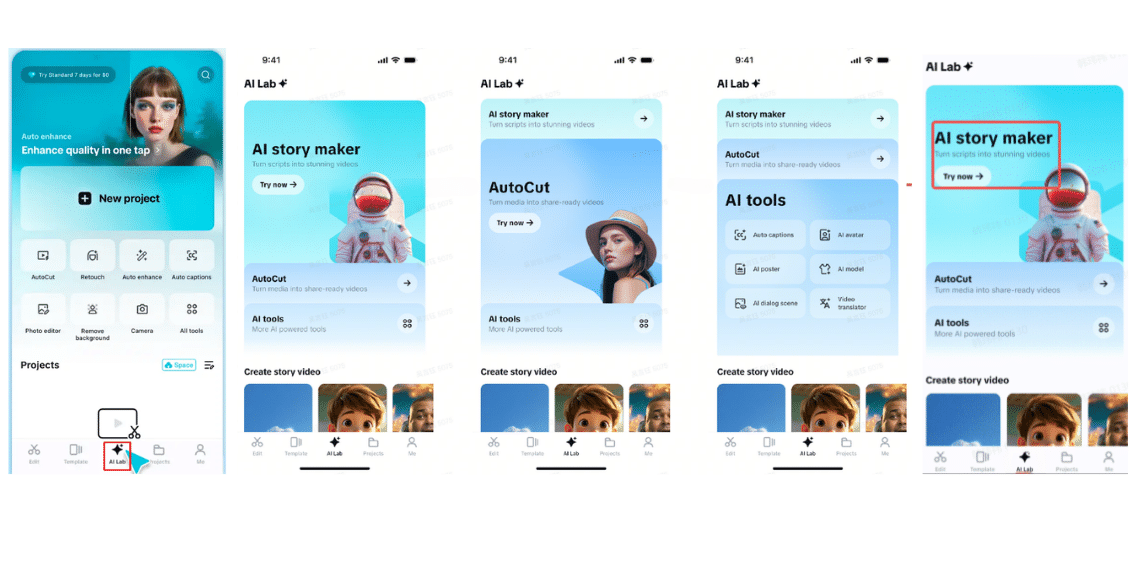
Step 1: Open the AI lab and choose AI story maker
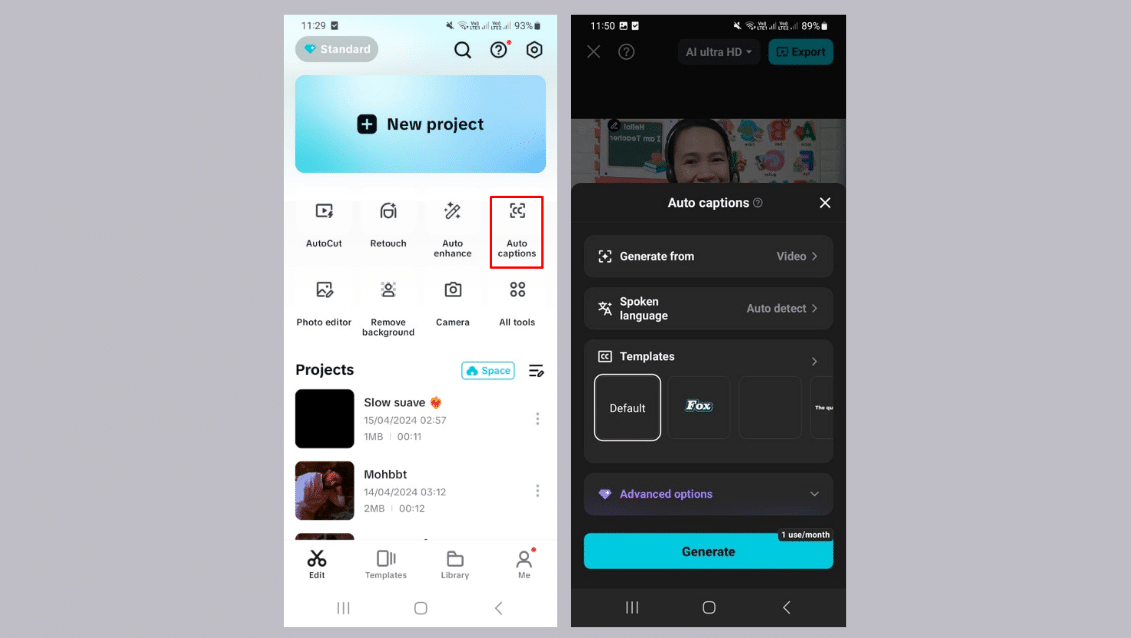
Open CapCut and find the “AI Lab” tab at the bottom of your screen. This menu contains “AI story maker”, “AutoCut”, and other “AI tools” to streamline creation. Choose “AI story maker” and tap “Try now” to jump into storytelling.
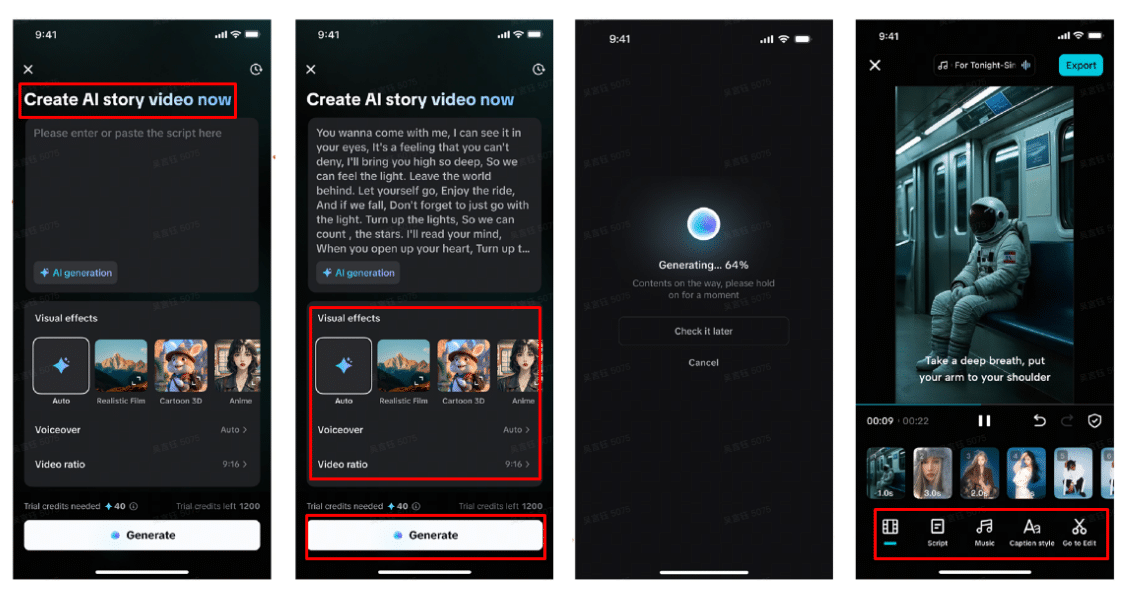
Step 2: Create and edit your story Paste your horror script into the “Create AI story video now” box. Pick a spooky visual style—Realistic Film or Anime work well here. Add a chilling “Voiceover” and tweak the “Video ratio” for your preferred platform. Tap “Generate” to start rendering the video.
Once ready, enhance the mood with background sounds from the “Music” tab. Use “Caption style” to animate eerie text or edit fonts and effects. Tap “Go to Edit” if you want to bring in jump scares, filters, or supernatural transitions.
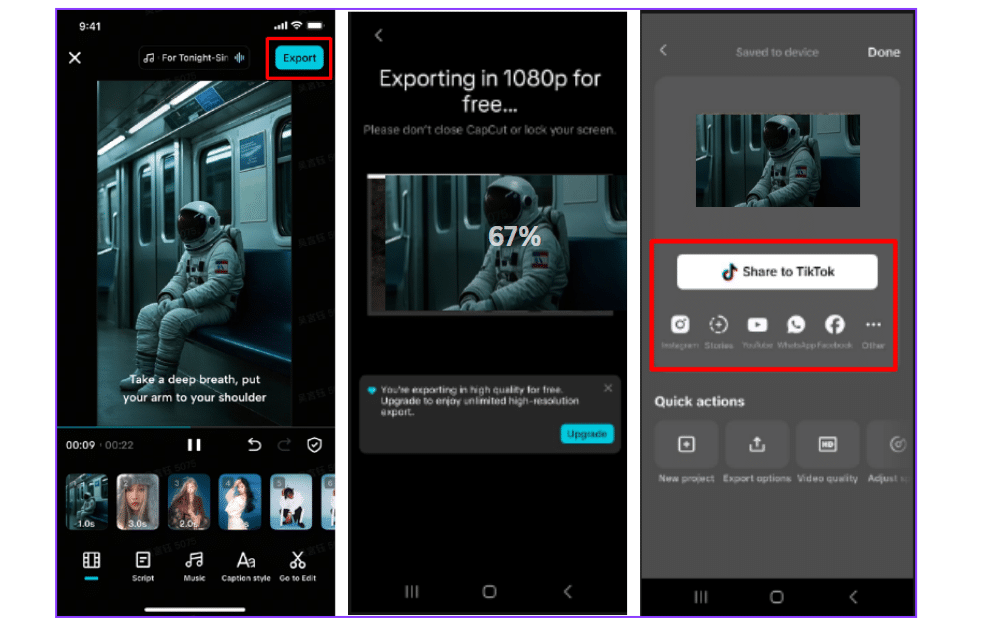
Step 3: Export and share your creation Tap “Export” from the top-right to save your horror story. Share it directly to TikTok, Instagram, or wherever your scary tales belong.
Conclusion
Creating horror content no longer needs a studio or expensive software. The CapCut App gives you full creative control with a tap. Scripts, pacing, audio and visuals are all worked through by AI tools in a single stream. It’s perfect for Halloween specials, content creators, or anyone who enjoys thrilling storytelling.
With the CapCut App, you become the director of your own digital nightmare.
Copyright @smorescience. All rights reserved. Do not copy, cite, publish, or distribute this content without permission.
Join 20,000+ parents and educators
To get the FREE science newsletter in your inbox!
SUBSCRIBE TO OUR NEWSLETTER
.......... ..........
Subscribe to our mailing list to get updates to your email inbox.